If you work from home and your back hurts by noon, your chair is probably the problem.
Lower back pain is one of the most common complaints among remote workers, and most people are sitting on chairs that were never designed for 6 to 8 hours of daily use. The good news is that the right ergonomic chair can make a dramatic difference, not just in how your back feels, but in your focus, energy, and long-term spinal health.
This guide breaks down the best ergonomic office chairs for lower back pain in 2026, all available in the US and Canada through Amazon or official retailers. Whether you have a $300 budget or you’re ready to invest in a premium seat, there’s an option here for you.
What Makes a Chair Good for Lower Back Pain?
Before jumping into recommendations, here’s what actually matters when you’re shopping for lumbar support and ergonomic comfort.
Lumbar support is the most critical feature. Look for adjustable lumbar that lets you position the support directly at the curve of your lower spine, typically around the L3 to L5 region.
Seat depth adjustment matters more than most people realize. If the seat is too deep, you’ll slouch forward. Too shallow and your thighs won’t be supported properly.
Adjustable armrests take pressure off your shoulders and neck, which indirectly reduces lower back strain. Look for 4D armrests (height, width, depth, and pivot).
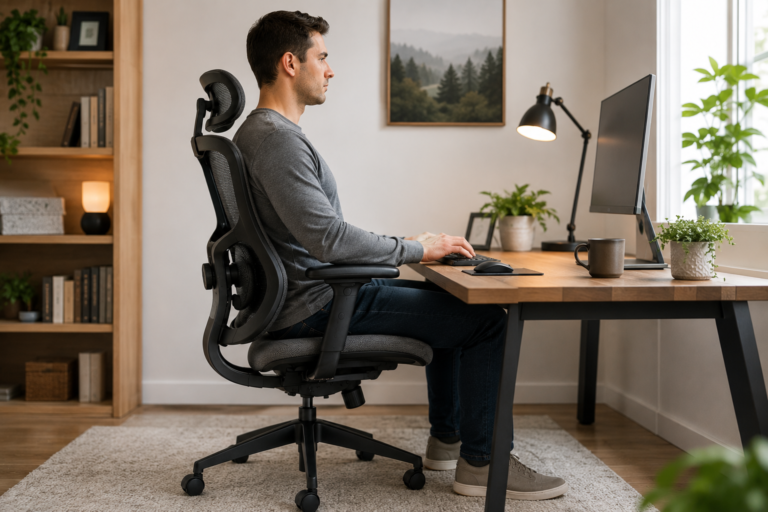
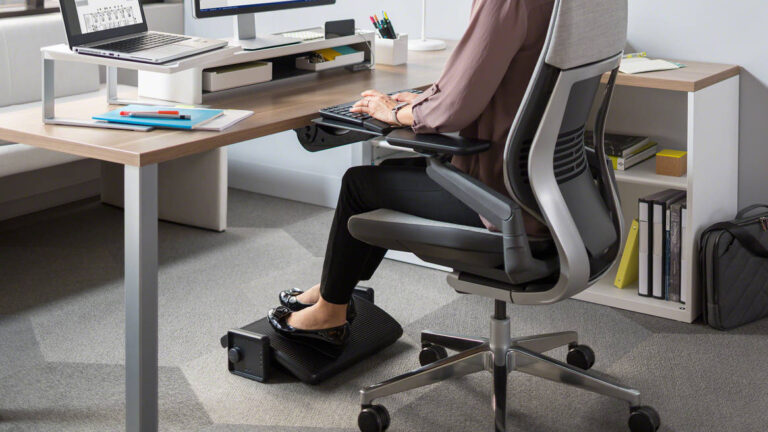
Seat height range should let your feet rest flat on the floor with your knees at roughly 90 degrees.
Tilt tension and recline allow your body to move naturally throughout the day rather than holding a rigid position, which is key for reducing muscle fatigue.
Best Ergonomic Office Chairs for Lower Back Pain in 2026
1. Herman Miller Aeron (Best Overall)
The Aeron has been the gold standard in ergonomic seating for decades, and the remastered version holds up in 2026. It features 8Z Pellicle mesh that flexes and conforms to your body, PostureFit SL lumbar support that targets both the sacrum and lumbar spine, and a fully adjustable recline with forward tilt.
It comes in three sizes (A, B, C) which is something most budget chairs skip entirely. Getting the right size makes a huge difference for lower back alignment.
Best for: Remote workers who sit 6 to 10 hours daily and want a chair that will last 10 plus years.
Price range: $1,400 to $1,900 USD
Pros:
- PostureFit SL is one of the best lumbar systems available
- Available in three sizes for true body-fit ergonomics
- 12-year warranty
- Proven long-term durability
Cons:
- Expensive
- Mesh feel is not for everyone
- No headrest on standard model

- Recycled Material
- Your purchase includes One Herman Miller Aeron Ergonomic Chair – Size B, graphite color
- Chair dimensions: 41″ H x 27″ W x 16.75″ D. Seat heights: 16”-20.5”.
2. Steelcase Leap V2 (Best for Active Sitters)
The Leap V2 is the chair that ergonomists consistently recommend for people with chronic lower back pain. Its LiveBack technology means the chair’s backrest actually changes shape to match your spine as you shift positions. The Lower Back Firmness control lets you dial in exactly how much support you want behind your lumbar region.
What sets the Leap apart is that it encourages natural movement rather than locking you into a single “correct” posture. If you fidget or shift a lot, this chair works with you instead of against you.
Best for: People who move around a lot while sitting and need a chair that adapts continuously.
Price range: $1,300 to $1,700 USD
Pros:
- LiveBack technology follows natural spine movement
- Adjustable lower back firmness
- Excellent seat depth adjustment
- Natural glide system keeps you aligned while reclining
Cons:
- Heavy chair, hard to move around
- Fabric options are more limited than competitors
- No mesh version available

- Buzz2 fabric is 100% polyester
- Wheels for hard flooring
- Ergonomic chair – features include adjustable seat depth, fully adjustable arms, height adjustable lumbar, lower back fi…
3. Secretlab Titan Evo (Best Mid-Range for Gaming and Work Hybrid)
Secretlab made its name in gaming chairs, but the Titan Evo has crossed over into serious work-from-home territory. It features a magnetic memory foam lumbar pillow that you can reposition anywhere along the backrest, plus a built-in adjustable lumbar system underneath it for dual support.
The cold-cure foam seat holds its shape over time, unlike cheaper foam that compresses within months. It also comes in multiple sizes including a larger XL that fits taller or heavier users that most office chairs ignore.
Best for: Remote workers who want premium feel at a mid-range price, especially if they also game.
Price range: $449 to $649 USD
Pros:
- Dual lumbar system (magnetic pillow plus built-in)
- Cold-cure foam resists long-term compression
- Available in multiple sizes including XL
- 5-year warranty
Cons:
- More gaming aesthetic than traditional office look
- Leather variants can get warm in summer
- Armrests are not quite as refined as Herman Miller

- ALL-DAY COMFORT FOR WORK & PLAY – PC chair made of cold-cure foam for ideal posture, comes with memory foam magnetic hea…
- ADJUSTABLE GAMER CHAIR THAT ADAPTS TO YOU – Full-metal 4D armrests for smooth, precise adjustments in four directions wi…
- DURABLE & BREATHABLE FABRIC – Stay cool all day with a more advanced version of our SoftWeave fabric. Softer, more beath…
4. Branch Ergonomic Chair (Best Value Under $500)
[Insert image here: Branch Ergonomic Chair in grey mesh, front view]
Branch has built a loyal following among remote workers by offering genuinely thoughtful ergonomics at a fraction of the price of Herman Miller or Steelcase. The adjustable lumbar support, breathable mesh back, and 4D armrests hit every major ergonomic checkbox.
The seat height range works well for people between 5’0″ and 6’3″, and the overall build quality is noticeably better than similarly priced competitors. It ships direct and assembles in under 20 minutes.
Best for: Budget-conscious remote workers who still want proper lumbar support and adjustability.
Price range: $329 to $499 USD
Pros:
- Excellent value for the price
- Adjustable lumbar support
- Breathable mesh back reduces heat buildup
- 4D armrests included at this price point
Cons:
- Not as refined as premium options
- Limited color selection
- Warranty is shorter than premium brands

- BRANCH NOW ON AMAZON: Hi, we’re Branch. We make it easy for people and teams to build a beautiful workspace where you ca…
- ADJUSTABLE SEAT: Improve your ergonomic setup with our ergonomic office chair, easily adjust the seat height and depth t…
- ERGONOMIC DESIGN: Get the best desk chair with wheels for your comfort and posture. Our innovative design ensures optimu…
5. Humanscale Freedom Chair (Best for Tall Users)
[Insert image here: Humanscale Freedom Chair in black leather, recline position]
The Freedom Chair takes a different approach to lumbar support. Instead of manual adjustments, it uses a self-adjusting recline mechanism that automatically shifts the lumbar support based on your body weight and recline angle. The headrest pivots forward as you lean back, keeping your neck supported in any position.
It is one of the best chairs available for users over 6 feet tall, with a generous seat depth and a high backrest that actually supports the thoracic and lumbar regions simultaneously.
Best for: Tall users and people who prefer automated ergonomics over manual adjustments.
Price range: $1,100 to $1,500 USD
Pros:
- Self-adjusting lumbar requires no manual setup
- Pivoting headrest stays aligned as you recline
- Exceptional build quality and durability
- Great fit for taller users
Cons:
- Automatic lumbar may not suit everyone’s preference
- Minimal color options
- Higher price point than some competitors with similar features

- Humanscale Freedom Chair with Headrest – Standard Height Adjustable Duron Arms
- Wheels – Standard Hard Casters for Carpet Flooring
- Responsive Backrest – The pivoting backrest automatically adapts to the changing needs of your spine during recline.
6. SIHOO Doro C300 (Best Budget Pick Under $300)
[Insert image here: SIHOO Doro C300 ergonomic chair in grey mesh, three-quarter view]
The SIHOO Doro C300 is the most impressive budget ergonomic chair on the market right now. It features an independent lumbar support system that can be adjusted vertically and in depth, a self-adapting backrest, and a high-density mesh that holds up better than most chairs at this price.
It won’t replace a Herman Miller, but for a home office where the budget is tight, it covers the basics far better than a standard office chair from a big box store.
Best for: First-time ergonomic chair buyers or secondary home office setups.
Price range: $249 to $299 USD
Pros:
- Adjustable lumbar depth and height
- Self-adapting backrest responds to body position
- Breathable mesh throughout
- Ships and assembles easily
Cons:
- Build quality shows limitations over time
- Armrests are not as refined as premium options
- Less durable foam padding

- 【Innovative Ergonomic Chair】SIHOO’s latest office chair has been developed using the latest technology to provide comfor…
- 【Wide Angle Adjustable Headrest and Trackable Backrest】The SIHOO A3 office chair features a 3D headrest with automatic m…
- 【Domino auto-adaptive lumbar support and 3D linkage armrest】The SIHOO A3 office chair features a 3D automatic macro-adju…
Ergonomic Chair Buyer’s Guide: What to Look for in 2026
Lumbar Support Types Explained
Not all lumbar support is the same. Here is a quick breakdown so you know what you are getting.
Fixed lumbar is a built-in curve in the backrest. It works if the curve happens to match your spine, but most people find it hits the wrong spot.
Manual adjustable lumbar lets you move the support up, down, in, and out. This is the sweet spot for most people because you can dial it in to your exact spinal curve.
Automatic or adaptive lumbar (like in the Humanscale Freedom or Steelcase Leap) adjusts dynamically as your body position changes. This is ideal if you find yourself forgetting to readjust.
How Much Should You Spend?
You do not need to spend $1,500 to get relief from lower back pain. Here is a general framework.
Under $350 gets you solid adjustability and basic lumbar support. The SIHOO Doro C300 and Branch chair live here.
$350 to $700 is where you get noticeably better build quality, longer warranties, and more refined ergonomics. The Secretlab Titan Evo sits in this range.
$700 and above is where you are paying for longevity, advanced lumbar systems, and chairs that are still comfortable 8 years from now. Herman Miller, Steelcase, and Humanscale live here.
Mesh vs. Foam vs. Leather
Mesh is the best option for most remote workers. It breathes, conforms to your body, and does not compress over time the way foam does.
Foam can be comfortable initially but often loses its supportive properties within 2 to 3 years of heavy use. Cold-cure foam (used in Secretlab) is significantly better.
Leather or faux leather looks professional but traps heat and can crack over time. Better suited to shorter work sessions.
Sizing Matters More Than People Think
If you are under 5’4″ or over 6’2″, chair sizing should be a top priority. The Herman Miller Aeron’s three-size system and Secretlab’s XL option are notable for this. Sitting in a chair that is the wrong size essentially cancels out the ergonomic features.
How to Set Up Your Ergonomic Chair Correctly
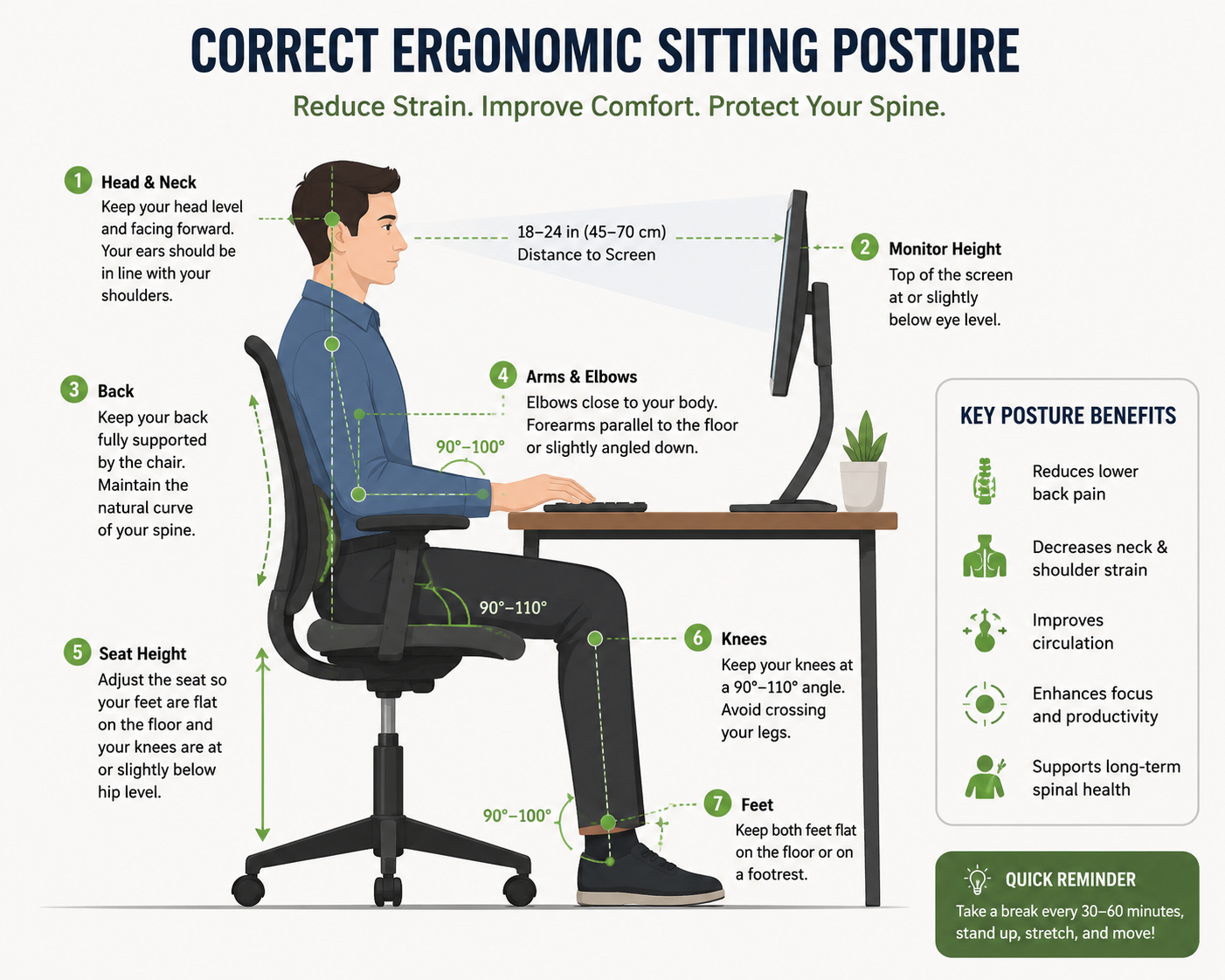
Even the best chair won’t help if it’s not set up right. Follow these steps after you unbox your chair.
Step 1: Set seat height so your feet are flat on the floor and your knees are at a 90-degree angle. Thighs should be roughly parallel to the ground.
Step 2: Adjust the seat depth so there is a two to three finger gap between the back of your knees and the front edge of the seat.
Step 3: Position lumbar support so it sits right at the inward curve of your lower back, roughly at belt level.
Step 4: Set armrests so your elbows rest at a 90-degree angle with your shoulders relaxed, not shrugged.
Step 5: If your chair has tilt tension, adjust it so you can recline slightly without too much effort. A 100 to 110 degree recline is ideal for reducing spinal disc pressure.
FAQs: Ergonomic Chairs for Lower Back Pain
What is the best ergonomic chair for lower back pain under $500?
The Branch Ergonomic Chair and Secretlab Titan Evo are both strong options under $500. The Branch is better for traditional office work, while the Titan Evo offers a more premium feel and dual lumbar system.
Are expensive ergonomic chairs worth it?
For remote workers sitting 6 plus hours daily, yes. Premium chairs like the Herman Miller Aeron and Steelcase Leap are engineered to maintain their support for 10 to 12 years, while budget chairs often degrade significantly within 2 to 3 years. The cost per year of use often evens out.
Can an ergonomic chair cure lower back pain?
An ergonomic chair reduces mechanical strain on your lumbar spine, which addresses a major cause of work-related back pain. However, it works best when combined with regular movement, stretching, and a proper desk setup. It is not a substitute for medical treatment if you have an underlying condition.
What lumbar support position is best for lower back pain?
The lumbar support should align with the natural inward curve of your lower back, typically around the L3 to L5 vertebrae. For most adults, this is just above belt level. The support should feel like gentle pressure filling the gap between your lower back and the backrest.
Is a mesh chair better for back pain than a foam chair?
Generally, yes. Mesh conforms to your body and distributes pressure more evenly than flat foam. It also prevents heat buildup, which increases comfort during long sessions. High-quality foam (like cold-cure foam) is a close second, but most budget foam degrades faster than mesh.
Which ergonomic chairs ship to Canada?
All chairs on this list are available in Canada. Herman Miller, Steelcase, and Humanscale ship direct to Canadian addresses. Branch, Secretlab, and SIHOO are available on Amazon Canada. Prices will vary slightly due to exchange rates and import fees.
How long should I sit before taking a break?
Even the best ergonomic chair cannot fully compensate for completely static sitting. The general recommendation is to stand or move for 5 to 10 minutes every hour. Many remote workers use a timer or standing desk in rotation with their ergonomic chair.
Final Verdict
If lower back pain is cutting into your workday, your chair is one of the highest-leverage changes you can make. The Herman Miller Aeron remains the best all-around choice for serious remote workers who want long-term investment-grade support. The Steelcase Leap V2 is the top pick if you move around a lot or have chronic pain that requires a chair that adapts with you.
For budget buyers, the Branch Ergonomic Chair punches well above its price, and the Secretlab Titan Evo is the best mid-range option if you want premium feel without a four-figure price tag.
Whatever you choose, make sure it has adjustable lumbar support, fits your body size, and includes seat depth adjustment. Those three features alone will make a bigger difference than almost anything else you can do for your home office setup.
Your back will thank you.
Disclosure: This post contains affiliate links. If you purchase through our links, we may earn a commission at no extra cost to you. All recommendations are based on ergonomic merit and user feedback.