
If you have ever spent a small fortune on an ergonomic chair hoping it would fix your back, only to find yourself still shifting uncomfortably by early afternoon, you are not alone. The question of whether ergonomic chairs actually help back pain is one of the most searched topics in the home office space, and the honest answer is more nuanced than most chair brands would like you to believe.
The short version is: yes, a well-designed ergonomic chair can genuinely reduce lower back pain, but only when it fits your body, is correctly adjusted, and is part of a broader approach to how you sit. A chair alone will not undo eight hours of poor posture, a badly positioned monitor, or the habit of sitting in exactly the same position from nine to five without moving.
This guide breaks down what the research actually says, which chair features have measurable impact on back pain, and what you can realistically expect from an ergonomic chair upgrade.
What Does the Research Actually Say?
The science on ergonomic chairs and back pain is genuinely positive, but with important caveats that most product pages conveniently skip.
A 2025 systematic review and meta-analysis published in the Journal of Clinical Medicine, which evaluated ergonomic interventions across multiple workplace environments, found that ergonomic seating interventions produced statistically significant reductions in musculoskeletal pain compared to standard office seating. The key phrase there is interventions, not just chairs. The most effective outcomes came when seating changes were combined with workstation adjustments and regular movement throughout the day.
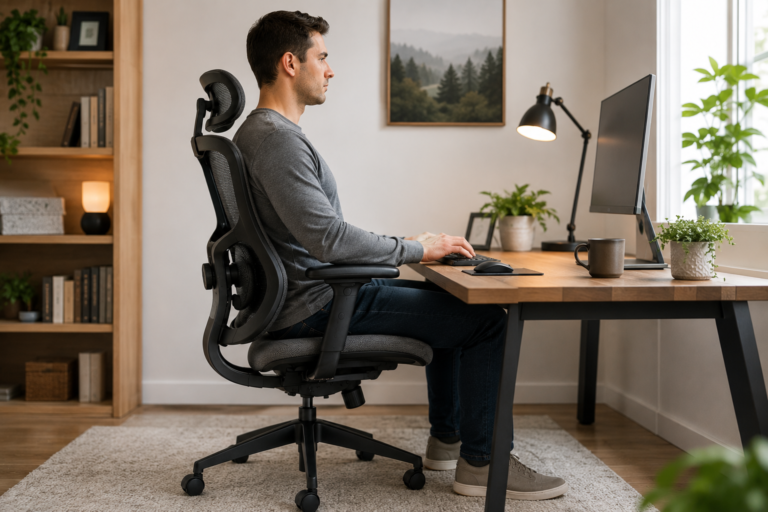
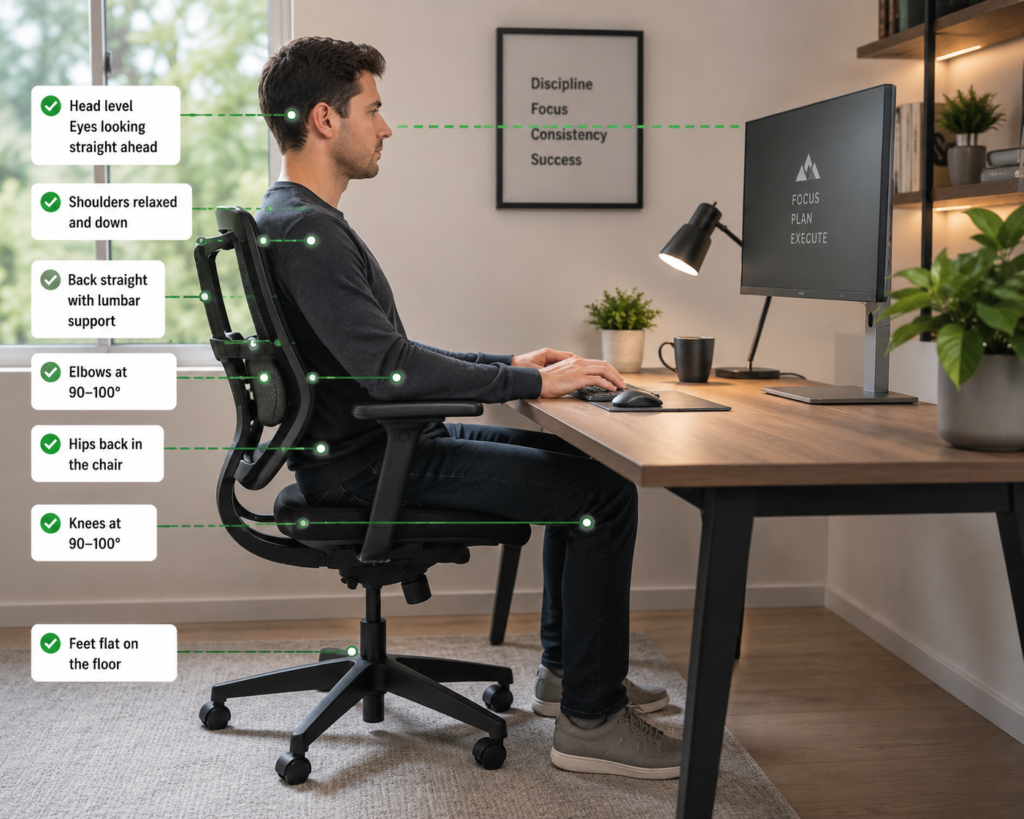
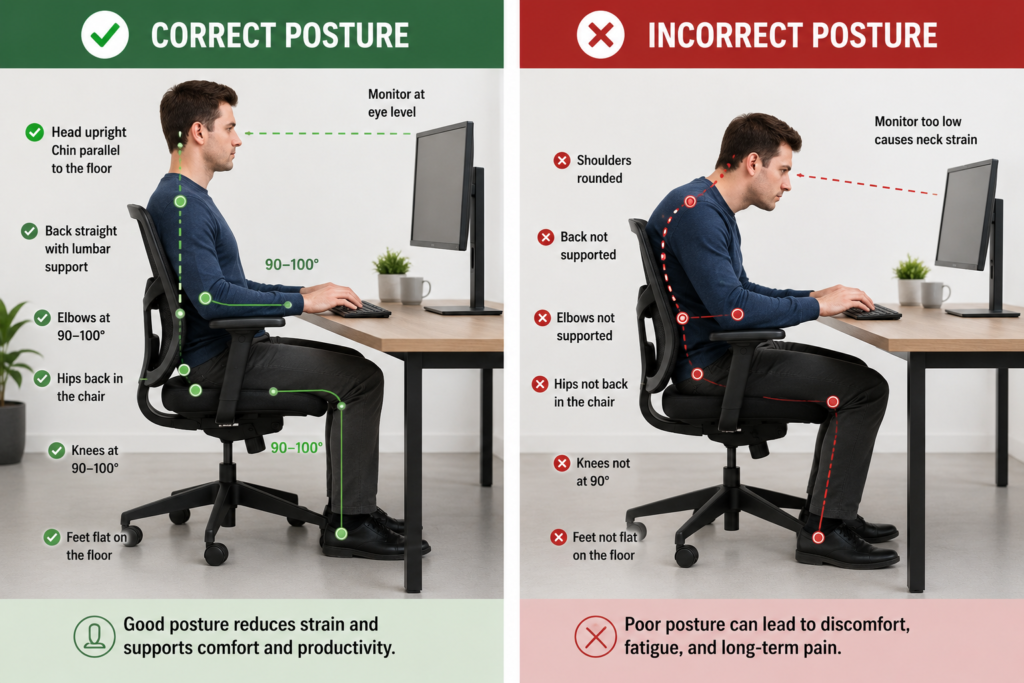
A landmark MRI study, originally published by Bashir et al. in Radiological Society of North America proceedings and subsequently validated through multiple follow-ups, found that sitting at exactly 90 degrees, the posture most people assume is correct, actually increases intradiscal pressure in the lumbar spine compared to sitting at a slight recline of around 100 to 135 degrees. This matters because most people buy an ergonomic chair, sit bolt upright in it, and wonder why their back still hurts. The chair is fine. The posture they chose while sitting in it is the problem.
OSHA’s computer workstation ergonomic guidelines are consistent with this research, recommending that lumbar support should maintain the natural inward curve of the lower back rather than forcing the spine into an artificially upright position.
The honest summary from the research is this: ergonomic chairs with adjustable lumbar support, correctly fitted to the user, produce measurable improvements in back pain symptoms over time. Chairs that are poorly fitted, unadjusted, or used without attention to the broader workstation setup produce much weaker results.
Which Chair Features Actually Make a Difference for Back Pain?
Not all ergonomic features are equal when it comes to back pain relief. Here is what the evidence supports most clearly.
Adjustable lumbar support. This is the single most impactful feature for lower back pain. A lumbar system that adjusts in height and depth allows you to position support at your exact lumbar curve rather than approximating an average. Research consistently shows that maintaining lumbar lordosis, the natural inward curve of the lower back, during extended sitting significantly reduces intradiscal pressure and muscular fatigue. Fixed lumbar pads work for some body types and not others. Dual-adjustable systems work for almost everyone.
Seat height. This affects your entire chain of posture from the ground up. If your seat is too high, your feet cannot rest flat on the floor, which tilts your pelvis backward and flattens your lumbar curve. Too low and your hips sit below your knees, which creates a different set of spinal loading problems. Getting seat height right before worrying about anything else is the single most important adjustment most people never make.
Seat depth. Underrated and rarely discussed in marketing. A seat that is too deep forces you to either slouch to reach the backrest or perch at the front edge without any back support at all. Both create lower back strain. A seat with depth adjustment, or one whose dimensions match your thigh length, eliminates this problem entirely.
Recline range. As the Bashir et al. research confirms, a slight backward lean reduces lumbar disc loading compared to sitting straight. A chair with a lockable recline that allows you to sit at 100 to 110 degrees for most of your working time is genuinely better for your lumbar spine than a chair that only locks in the upright position.
Armrest adjustability. Shoulders and neck pain are closely connected to lower back pain in long-term sitters. Armrests that sit too high force your shoulders upward, creating tension that runs all the way down the spine. Height-adjustable armrests that allow your shoulders to sit naturally relaxed reduce this secondary source of back strain.
What an Ergonomic Chair Cannot Do
This is the part most brands leave out of their product descriptions.
An ergonomic chair cannot compensate for a monitor that sits too low, which forces your head forward and loads the cervical and upper thoracic spine. It cannot fix a keyboard that sits too high, which raises your shoulders and creates tension that compounds lower back fatigue. And it cannot undo the physical consequence of sitting in any position, however ergonomically correct, for more than 45 to 60 minutes without moving.
Research from The Lancet Public Health found that spinal disc hydration begins declining measurably after approximately 50 minutes of continuous sitting regardless of chair type. The chair reduces the rate of degeneration but does not eliminate it. Regular position changes, standing, and walking remain important components of managing back pain from sedentary work.
If you are using a standing desk alongside your ergonomic chair, the combination is the most effective approach. Alternating between sitting and standing throughout the day addresses what no chair, however expensive, can fix on its own. Our best standing desk under $300 guide covers the desks that pair best with any ergonomic chair setup if you are considering that combination.
Does Chair Price Determine How Much It Helps?
Not directly. The research supports features, not price points. A correctly fitted $200 chair with dual-adjustable lumbar support, proper seat depth, and a usable recline mechanism will address back pain more effectively than a $600 chair used without adjustment at the wrong height with the lumbar support in the factory position.
That said, price does correlate with the quality and range of those adjustments. Budget chairs often have fixed lumbar pads rather than dual-adjustable systems, shallower recline ranges, and lower-quality foam that compresses faster under daily use. Premium chairs invest in mechanisms that hold their adjustment positions more reliably over years rather than months.
For most home office users sitting three to seven hours daily, a well-chosen chair in the $150 to $300 range delivers the features that actually matter for back pain relief without requiring a four-figure investment. Our best office chairs under $300 guide and SIHOO M57 review both cover specific chairs at this range that hit the key ergonomic criteria the research supports.
For users whose back pain is the primary concern and who are open to a premium investment, our AndaSeat Kaiser 4 vs Secretlab Titan Evo comparison covers two of the most advanced lumbar systems available outside the Herman Miller price bracket.
Gaming Chairs vs Ergonomic Office Chairs for Back Pain
This question comes up constantly, and the honest answer is that the category label matters less than the specific features.
Most budget gaming chairs use fixed lumbar pillows and bucket seat designs that prioritise aesthetics over spinal alignment. Many dedicated ergonomic office chairs prioritise adjustability and neutral posture support over visual appeal. At the feature level, a gaming chair with a dual-adjustable lumbar mechanism is better for back pain than an ergonomic office chair with a fixed pad, regardless of what the marketing says about either.
The more relevant question is which specific chair has the features your back actually needs. If gaming is your primary use case and back pain during long sessions is the main concern, our best gaming chairs for back pain guide covers the specific chairs that address lumbar support most effectively in that category.
Small Additions That Compound the Effect of a Good Chair
A good ergonomic chair addresses the back-to-seat interface. Several additional products address the parts of the sitting equation that the chair itself cannot reach.
A lumbar support pillow can meaningfully improve the lumbar support of a chair that lacks independent adjustment. For chairs where the built-in lumbar sits too high or too low for a specific user, an external pillow repositioned to the correct height outperforms the built-in system. Our best lumbar support pillow guide covers the options that hold their position reliably rather than sliding during the day.
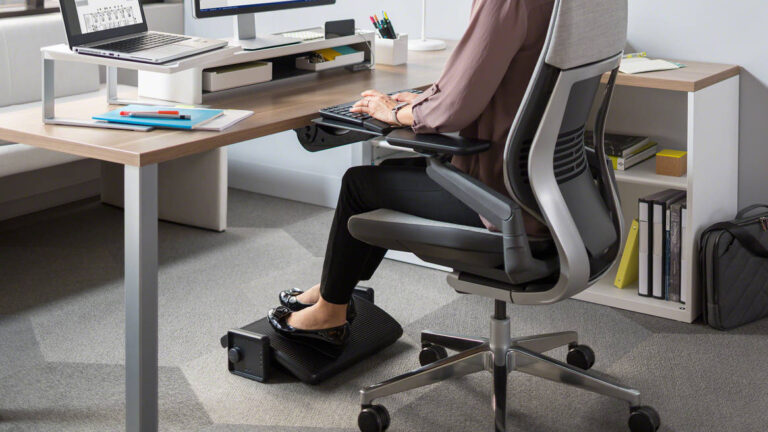
An ergonomic footrest addresses what happens below the seat. For users whose feet do not rest comfortably flat on the floor at the correct seat height, a footrest restores the pelvic angle that the chair’s lumbar support is trying to maintain. The two work together rather than independently. Our best ergonomic footrest guide covers the options that make the most practical difference for home office users.
Mayo Clinic’s office ergonomics guidance recommends treating lumbar support, seat height, monitor positioning, and movement frequency as a connected system rather than addressing any single element in isolation. That framework is consistent with what the research supports and with the practical experience of most people who have gone through the process of properly setting up an ergonomic workspace.
How Long Before You Notice a Difference?
Expectations matter here because people often give up on a new ergonomic chair after a week and conclude it did not work.
Memory foam and high-density foam both take time to conform to your specific body weight distribution. The research on ergonomic interventions typically measures outcomes over four to six week periods, not days. The initial adjustment period, where a new chair feels unfamiliar compared to whatever you were sitting in before, is normal and does not indicate the chair is not working.
More importantly, the process of correctly adjusting the chair takes experimentation. Most people set the seat height once and never touch the lumbar or armrest adjustments. Getting the lumbar support positioned at the right height for your specific spine takes a few days of minor adjustment and pays a disproportionate dividend once it is right.
Give any new ergonomic chair a minimum of three weeks of properly adjusted daily use before making a judgment about whether it helps. If you are still experiencing significant discomfort after that period with the chair correctly fitted, the problem may lie elsewhere in your workstation setup or may be a medical issue worth discussing with a healthcare professional.
Frequently Asked Questions
Do ergonomic chairs actually help with lower back pain? Yes, particularly chairs with adjustable lumbar support. Research published in the Journal of Clinical Medicine found that ergonomic seating interventions produce statistically significant reductions in musculoskeletal pain compared to standard office seating. The key is correct adjustment and fit to your body, not just the presence of ergonomic features.
How long does it take for an ergonomic chair to help back pain? Most research measures outcomes over four to six weeks of regular use. Initial adjustment to a new chair takes one to two weeks. Correct positioning of lumbar support and seat height, combined with regular position changes throughout the day, produces the most consistent results over this period.
Is an expensive ergonomic chair worth it for back pain? Features matter more than price. A $200 chair with dual-adjustable lumbar support, correctly fitted, will address back pain more effectively than a $600 chair used without adjustment. That said, higher-priced chairs tend to offer wider adjustment ranges and longer-lasting mechanisms that maintain their position more reliably over years.
Can a lumbar support pillow replace an ergonomic chair for back pain? A lumbar pillow can meaningfully improve any chair’s lumbar support, including chairs without built-in adjustment. It cannot fix a chair with structural problems like a collapsed seat cushion or poor height adjustment range. The best approach is a well-fitted chair combined with a lumbar pillow where additional support is needed.
Should I use a gaming chair or an ergonomic office chair for back pain? The category matters less than the specific features. A gaming chair with adjustable lumbar support, correct seat depth, and a usable recline addresses back pain as effectively as an equivalently featured ergonomic office chair. Most budget gaming chairs prioritise aesthetics over adjustability, which is where the real difference lies at the feature level.
Does a standing desk help with back pain alongside an ergonomic chair? Yes, significantly. Alternating between sitting and standing throughout the day addresses spinal disc compression in a way that no chair, however well designed, can achieve alone. Research consistently supports the combination of ergonomic seating with regular position changes as the most effective approach to managing back pain from sedentary work.
Final Thoughts
Ergonomic chairs do help with back pain, but not automatically and not without proper setup. The research is clear that adjustable lumbar support, correct seat height, and a usable recline range produce measurable improvements in lower back pain symptoms over time. The research is equally clear that these features only work when the chair is correctly fitted and used as part of a broader approach to how you sit.
If you are starting from a chair with no lumbar support and no height adjustment, almost any well-designed ergonomic chair will represent a meaningful improvement. If you are already in a reasonably decent chair and still experiencing discomfort, the answer is more likely in how the chair is adjusted, where your monitor sits, and how often you move rather than in buying something more expensive.
For specific chair recommendations at every budget level, our best office chairs under $300 guide and best ergonomic chairs for remote workers with lower back pain cover the options most likely to make a practical difference. And if you want to understand more about why your workspace setup affects how you feel at the end of a working day, our guide on why comfort matters in remote work covers the broader picture.
Note: This article is for informational purposes only and does not constitute medical advice. If you are experiencing persistent or severe back pain, consult a qualified healthcare professional.