
Looking for the best monitor arm under $50? We break down five budget picks with real gas spring performance, weight capacity, and build quality for home office and gaming setups.
The honest caveat, worth stating upfront, is that the under $50 bracket does involve trade-offs. Arms in this range use more plastic in their construction than mid-range alternatives, gas springs are less smooth, and adjustment mechanisms are less precise. For users who reposition their monitor frequently or need buttery-smooth movement, a budget arm may feel frustrating. For users who set their monitor position once and leave it, these arms do the job reliably at a price that is hard to argue with.
This guide covers the best monitor arms under $50 on Amazon, what the specs actually mean, and which one suits different desk setups and monitor sizes. Paired with a standing desk, a monitor arm is particularly effective — our best standing desk under $300 guide covers the desks that work best with any monitor arm on this list.
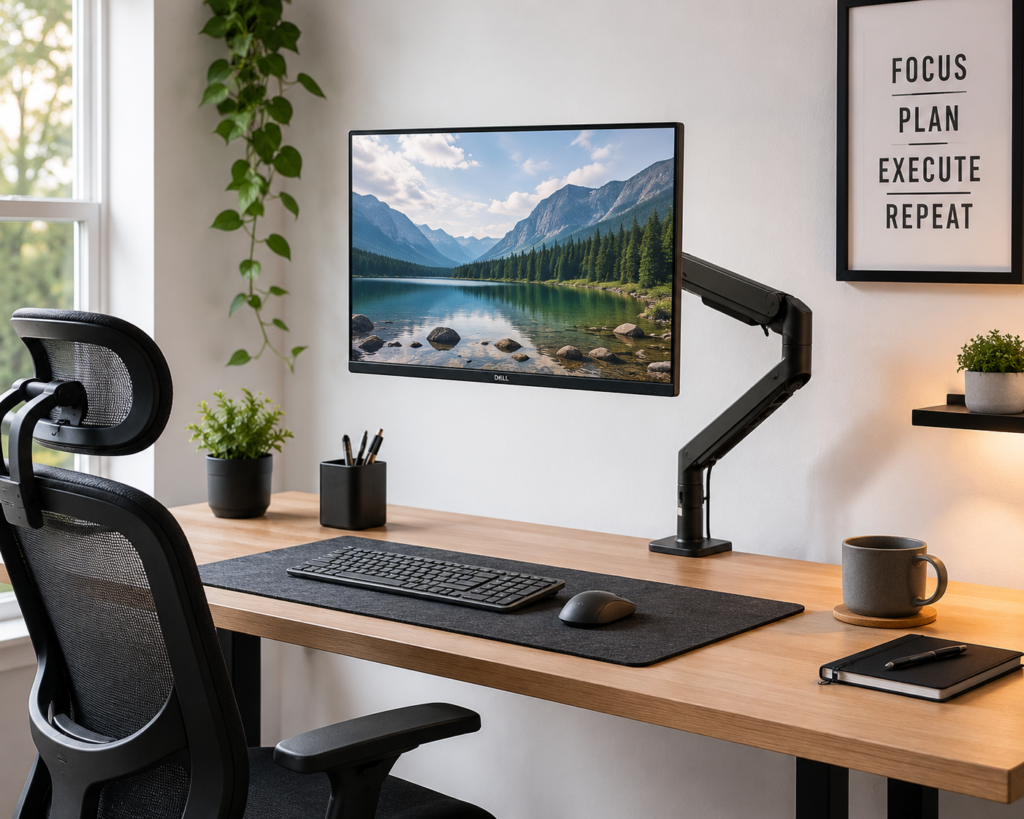
Quick Recommendations
- Best Overall Under $50: HUANUO HNSS6 Single Monitor Arm
- Best Budget Under $30: North Bayou F80 Monitor Mount
- Best for Heavier Monitors: WALI Single Monitor Mount (GSMP001N)
- Best Premium Pick at the $50 Ceiling: VIVO Premium Aluminum Gas Spring Arm (STAND-V001Q)
- Best for Gaming Setups: HUANUO FlowLift Single Monitor Mount
What to Look for in a Monitor Arm Under $50
The specs that matter most in this price range are different from what premium arms compete on. Here is what to check before buying.
Gas spring vs. friction joint. This is the most important distinction at this price. A gas spring arm uses a pressurised cylinder to counterbalance your monitor’s weight, meaning you can lift and lower the screen with one hand and it stays wherever you leave it. A friction joint arm uses a manually tightened joint that you loosen to adjust and retighten to hold. Both work, but gas spring arms are easier to adjust day to day. Most arms under $50 have gas springs, but the quality of that spring varies significantly — a weak gas spring will not hold heavier monitors at full extension.
Weight capacity. This is the most commonly misjudged spec in this category. Check your monitor’s actual weight on the manufacturer’s spec page before buying. A 27-inch monitor typically weighs 9 to 13 pounds. A 32-inch monitor typically weighs 13 to 18 pounds. Arms that list 19.8 pounds capacity are covering most standard monitors, but if your monitor is heavier, check carefully.
VESA compatibility. All standard monitor arms mount via a VESA pattern — a square grid of screw holes on the back of your monitor. The two most common are 75x75mm and 100x100mm. Check the back of your monitor for VESA markings before purchasing. Most modern monitors are VESA compatible but some budget displays and ultra-thin monitors are not.
Desk clamp vs. grommet mount. Most arms come with both options. A desk clamp attaches to the edge of your desk and suits glass, wood, and most standard desk surfaces. A grommet mount threads through a hole in the desk and provides more stability for heavier monitors. Both work well for standard setups.
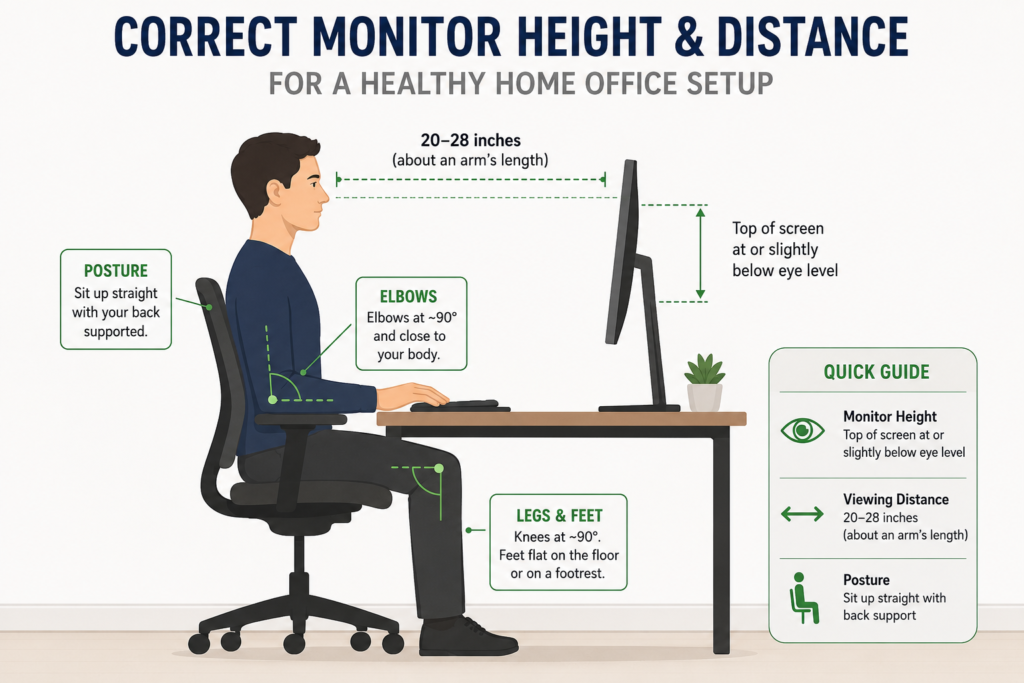
Arm reach. Measured in how far the arm extends from the mounting point, this determines how far forward or back you can position your monitor. Most arms under $50 have enough reach for a standard home office desk where the monitor sits roughly 20 to 28 inches from where you sit.
OSHA’s computer workstation ergonomics guidelines recommend positioning your monitor at or slightly below eye level, approximately an arm’s length away. A monitor arm is the most practical way to achieve this positioning without raising your entire desk, particularly for users whose monitor stand does not adjust to the correct height.
HUANUO HNSS6 Single Monitor Arm — Best Overall Under $50
The HUANUO HNSS6 is the most consistently recommended budget monitor arm across independent review communities in 2026, and it earns that position through a combination of genuine gas spring performance, 19.8 pound weight capacity, and a build quality that outperforms most arms at a similar price. It supports monitors from 13 to 32 inches across standard VESA 75x75mm and 100x100mm patterns and comes with both C-clamp and grommet mounting options included.
The gas spring has been independently tested to 20,000 lift cycles, which gives it more credibility than the unspecified springs found on cheaper alternatives. At under $40 on Amazon, it is the most capable arm on this list for the price and handles the full range of standard 24 to 27 inch monitors that most home office users are working with.
The primary limitation is that initial tension adjustment requires some patience. The gas spring tension is set at the factory for an average monitor weight, and users with lighter or heavier monitors may need to adjust the tension screw at the arm’s pivot point. This takes about five minutes once you understand where the screw is located.
Key features:
- Gas spring with 20,000 cycle tested mechanism
- Supports 13 to 32 inch monitors up to 19.8 pounds
- VESA 75x75mm and 100x100mm compatible
- 360-degree rotation, tilt, and swivel
- C-clamp and grommet mounting included
- Integrated cable management channel
- Desk thickness compatibility: 0.39 to 3.54 inches
Pros:
- Gas spring quality is above average for this price range
- 20,000 cycle tested mechanism adds credibility to durability claims
- 19.8 pound capacity covers most standard 24 to 32 inch monitors
- Cable management channel keeps wires tidy
- Both mounting options included without additional cost
Cons:
- Initial tension setup requires manual adjustment for lighter or heavier monitors
- Plastic cladding over metal framing, not full metal construction
- Adjustment is less smooth than mid-range gas spring alternatives
Who it’s best for: Home office users with a standard 24 to 27 inch monitor who want the most capable gas spring arm available under $50 without spending $80 or more on a premium alternative.

- Great Adaptability: This HUANUO single monitor arm fits 13-32 inch monitors, holds 4.4-19.8 lbs, suitable for VESA patte…
- Full Adjustable: This PC monitor stand can remain completely stable at any angle without any extra work. Compared with o…
- 80% Sturdier Than Others: At HUANUO, we focus on improving the strength and stability of our single monitor stand. The s…
North Bayou F80 — Best Budget Under $30
The North Bayou F80 is the most widely purchased budget monitor arm on Amazon and has been for several years. It consistently prices under $30, sometimes significantly so, and delivers a functional gas spring arm for the price. North Bayou has been manufacturing ergonomic mounting solutions since 2006 and owns its manufacturing facility, which gives the F80 more engineering consistency than generic unbranded alternatives at a similar price.
The F80 suits monitors from 17 to 30 inches up to 19.8 pounds and includes the same C-clamp and grommet mounting options as the HUANUO. The adjustment mechanism is stiffer than the HNSS6’s gas spring, which means it requires more force to reposition and the experience of adjusting it is less smooth. For users who set their monitor position once and rarely change it, this is a non-issue. For users who frequently adjust throughout the day, it will feel less refined.
The honest assessment from independent reviews is consistent: the F80 is the right choice when price is the primary constraint and you are setting up a secondary monitor or a spare workstation rather than your main daily driver.
Key features:
- Gas spring mechanism
- Supports 17 to 30 inch monitors up to 19.8 pounds
- VESA 75x75mm and 100x100mm compatible
- 360-degree rotation, ±90-degree swivel, tilt adjustment
- Height adjustment range: 10.2 inches
- C-clamp and grommet mounting included
Pros:
- Consistently the lowest price on this list
- Established brand with manufacturing track record since 2006
- Covers most standard monitor sizes
- Both mounting options included
- Works reliably once set to the correct position
Cons:
- Stiffer adjustment mechanism than gas spring alternatives
- Not ideal for users who reposition frequently
- 10.2-inch height adjustment range is the most limited on this list
- Plastic construction becomes more brittle over time than metal alternatives
Who it’s best for: Budget-first buyers setting up a secondary monitor, spare room workstation, or anyone who wants to test whether a monitor arm changes their workflow before investing in something more premium.

- ☑Universal: Fits computer monitor within 4.4 to 19.8 lbs, Which mean it can work for most of 17~30 inch monitors in the …
- ☑Full motion and more Adjustable: The monitor can be rotated and tilted effortlessly in any direction, Tilt Angel from -…
- ☑85% Sturdier than similar product: Heavy-duty construction and super quality materials Built in automotive-grade gas sp…
WALI Single Monitor Mount GSMP001N — Best for Heavier Monitors
The WALI GSMP001N stands out in this price range for its 26.4 pound weight capacity, which is meaningfully higher than the 19.8 pound limit found on most other arms under $50. For users with larger 32-inch monitors, curved displays, or simply heavier screens that other budget arms struggle to hold at full extension, the WALI’s higher-rated gas spring makes it the most practical choice.
The arm supports monitors from 13 to 34 inches and includes a full motion articulating design with 360-degree rotation, swivel, and tilt adjustment. The build quality is consistent with the HUANUO HNSS6 in terms of plastic cladding over a metal frame, and the cable management channel keeps wires organised at the back of the arm. At typically under $40 on Amazon, it sits between the North Bayou and HUANUO on price while offering the widest weight range on this list.
Key features:
- Supports 13 to 34 inch monitors up to 26.4 pounds
- Gas spring mechanism
- VESA 75x75mm and 100x100mm compatible
- Full motion articulation with 360-degree rotation
- C-clamp and grommet mounting included
- Integrated cable management
Pros:
- 26.4 pound weight capacity is the highest on this list
- Supports monitors up to 34 inches including some ultrawide displays
- Full motion articulation covers all standard positioning needs
- Cable management included
- Both mounting options included
Cons:
- Adjustment smoothness is comparable to other budget arms, not premium
- Plastic construction limits long-term durability versus metal alternatives
- Less established brand than HUANUO or North Bayou in terms of review history
Who it’s best for: Users with heavier monitors, larger displays up to 34 inches, or anyone who has found that other budget arms struggle to hold their screen at full extension without slowly drifting downward.

- Compatibility: Fits LCD, LED flat screen TV and monitor up to 33″. Support up to 19.8 lbs. Mounting Holes fits 75 x 75mm…
- Fully Adjustable: The Single Monitor Arm Can Tilt +70°/-45°, Swivel +/-180°, And Rotate 360°. Max Height Is Up To 23.6″,…
- Double Benefits: Double efficiency and productivity to make working or relaxing that much more comfortable
VIVO STAND-V001Q Premium Aluminum Gas Spring Arm — Best at the $50 Ceiling
The VIVO STAND-V001Q sits at or just under the $50 price ceiling and earns its premium position on this list through aluminum construction that most budget arms do not use. Where the other arms here use plastic cladding over a metal frame, the VIVO uses aluminum as its primary material, which translates to less flex in the arm, a more premium feel in adjustments, and better long-term durability than plastic alternatives.
The gas spring is smoother than the North Bayou and WALI options, and the overall adjustment experience feels closer to a mid-range arm than a budget one. It supports monitors up to 32 inches and 17.6 pounds, which covers most standard 24 to 27 inch home office displays. The clean matte finish suits professional and home office environments equally well.
If your budget allows you to reach $50 rather than needing to stay closer to $30, the VIVO STAND-V001Q is the most compelling option on this list in terms of build quality and long-term reliability.
Key features:
- Aluminum construction (not just cladding)
- Gas spring arm with smooth adjustment
- Supports monitors up to 32 inches and 17.6 pounds
- VESA 75x75mm and 100x100mm compatible
- C-clamp and grommet mounting included
- 360-degree rotation, swivel, and tilt
- Clean matte finish
Pros:
- Aluminum construction outperforms plastic alternatives for long-term durability
- Smoother adjustment than most other arms at this price
- Clean professional aesthetic suitable for home office and professional environments
- Both mounting options included
- Established VIVO brand with strong customer service record
Cons:
- 17.6 pound weight capacity is the lowest on this list, limiting compatibility with heavier displays
- Sits at the top of the $50 budget ceiling
- Less full motion range than some competitors on swivel depth
Who it’s best for: Home office users who want the closest experience to a mid-range monitor arm at a budget price, particularly those with standard 24 to 27 inch monitors who will use the arm daily and want something that feels more refined than a plastic budget arm.

- Single-arm monitor stand frees up desktop space and offers ergonomic viewing comfort
- Works with almost any LCD monitor up to 32 inches and up to 25 pounds
- Adjustable arm extends and retracts; adjustable tilt (70 degrees back, 5 degrees forward) to change reading angles; 360 …
HUANUO FlowLift Single Monitor Mount — Best for Gaming Setups
The HUANUO FlowLift is the newer generation of HUANUO’s single arm lineup and addresses the main criticism of budget monitor arms in gaming contexts: the aesthetic. Where the HNSS6 has a functional but utilitarian look, the FlowLift uses a cleaner design language with smoother lines that suits gaming setups and battlestations better than the industrial look of most budget arms.
The specs match the HNSS6 closely: 19.8 pound capacity, 13 to 32 inch monitor support, and VESA 75x75mm and 100x100mm compatibility. The gas spring mechanism is comparable in quality. The primary reason to choose the FlowLift over the HNSS6 is the visual design rather than a performance difference, making it the natural choice for users whose desk aesthetic matters alongside function.
Key features:
- Gas spring mechanism
- Supports 13 to 32 inch monitors up to 19.8 pounds
- VESA 75x75mm and 100x100mm compatible
- Full motion articulation with 360-degree rotation
- C-clamp and grommet mounting included
- Cleaner modern design language suited to gaming setups
Pros:
- Modern design suits gaming setups and battlestations better than industrial-look alternatives
- Same gas spring quality as the HNSS6 at a similar price
- Full motion articulation covers all standard gaming monitor positions
- Both mounting options included
- HUANUO brand reliability
Cons:
- No meaningful performance advantage over the HNSS6 — the design is the primary differentiator
- Slightly newer with a smaller review base than the established HNSS6
- Same plastic construction limitations as other budget arms
Who it’s best for: Gamers and battlestation builders who want a monitor arm that fits their desk aesthetic without paying premium prices. Also a strong choice for anyone building a clean, minimal desk setup where the arm is visible and its appearance matters.
- Great Adaptability: This HUANUO single monitor arm fits 13-32 inch monitors, holds 4.4-19.8 lbs, suitable for VESA patte…
- Full Adjustable: This PC monitor stand can remain completely stable at any angle without any extra work. Compared with o…
- 80% Sturdier Than Others: At HUANUO, we focus on improving the strength and stability of our single monitor stand. The s…
How These Monitor Arms Compare
| Monitor Arm | Weight Capacity | Monitor Size | Construction | Gas Spring | Price Range | Best For |
|---|---|---|---|---|---|---|
| HUANUO HNSS6 | 19.8 lbs | 13–32″ | Plastic/metal | 20,000 cycle tested | ~$35–$45 | Best overall |
| North Bayou F80 | 19.8 lbs | 17–30″ | Plastic/metal | Standard | ~$25–$35 | Budget/secondary |
| WALI GSMP001N | 26.4 lbs | 13–34″ | Plastic/metal | Standard | ~$35–$45 | Heavier monitors |
| VIVO STAND-V001Q | 17.6 lbs | Up to 32″ | Aluminum | Smooth | ~$45–$50 | Build quality |
| HUANUO FlowLift | 19.8 lbs | 13–32″ | Plastic/metal | Standard | ~$35–$45 | Gaming setups |
For build quality: The VIVO STAND-V001Q’s aluminum construction leads the group and justifies the slightly higher price for users who want the arm to last beyond a couple of years.
For weight capacity: The WALI GSMP001N’s 26.4 pound limit is the highest on the list and makes it the only arm here genuinely suited to heavier 32-inch or curved monitors.
For price: The North Bayou F80 is the most affordable and does the basic job for lighter monitors that do not need frequent repositioning.
For aesthetics: The HUANUO FlowLift suits gaming setups and clean minimal desks better than the more utilitarian alternatives.
Which Monitor Arm Should You Choose?
If this is your first monitor arm and you have a standard 24 to 27 inch monitor, the HUANUO HNSS6 is the safest choice. The 20,000 cycle tested gas spring gives you more confidence than unspecified springs, and the price leaves room to upgrade later if you find you want a premium arm.
If your primary concern is price and you set your monitor position once, the North Bayou F80 gets the job done at the lowest cost on this list. Do not expect smooth daily repositioning but as a set-and-forget arm it is reliable.
If your monitor is larger or heavier than average, the WALI GSMP001N’s 26.4 pound capacity is the right choice. Most other arms under $50 will struggle to hold heavier displays at full extension without drifting over time.
If you want the best build quality available at this price, the VIVO STAND-V001Q’s aluminum construction is meaningfully better than the plastic alternatives and the smoothest adjustment experience on this list.
If your desk aesthetic or gaming setup matters as much as function, the HUANUO FlowLift’s cleaner design lines suit battlestations and minimal desks better than the industrial look of other budget arms.
A monitor arm pairs most effectively with a proper desk and chair setup. Getting your monitor at eye level is the most visible ergonomic benefit, but it works best when your chair is also correctly adjusted. Our best office chairs under $300 guide covers the chairs that pair well with any monitor arm setup, and our best office chairs for lower back pain guide addresses the full ergonomic picture for users whose back health is the primary concern.
As Mayo Clinic’s office ergonomics guidance notes, monitor height is one of the most commonly overlooked ergonomic factors in home office setups. A monitor positioned too low forces the head and neck forward, which creates cervical strain that compounds lower back tension over long sessions. A monitor arm that positions your screen at or slightly below eye level addresses this at the source.
Frequently Asked Questions
Are cheap monitor arms worth buying? Yes, for most home office users. A budget monitor arm under $50 delivers the two primary benefits of any monitor arm: freeing up desk space and allowing you to position your monitor at the correct eye level. The trade-offs versus premium arms are less smooth adjustment, more plastic in the construction, and a lower weight ceiling. For a standard 24 to 27 inch monitor that you set once and rarely reposition, the difference in daily experience is minimal.
What size monitor can a budget arm hold? Most arms under $50 support monitors up to 32 inches and 19.8 pounds. The WALI GSMP001N extends to 34 inches and 26.4 pounds. Check your specific monitor’s weight on its manufacturer spec page before buying — weight is more important than screen size since two monitors of the same screen size can have significantly different weights depending on the stand and bezel design.
Do I need to check if my monitor is VESA compatible before buying an arm? Yes. Look at the back of your monitor for a square grid of four screw holes. If they are present, your monitor is VESA compatible. The two most common patterns are 75x75mm and 100x100mm, both of which are supported by all five arms on this list. Some ultra-thin monitors and budget displays do not have VESA holes — in that case, you would need a VESA adapter plate, which adds cost and some bulk.
How thick does my desk need to be for a monitor arm? Most arms on this list work with desks between 0.39 and 3.54 inches thick. This covers most standard home office desks including IKEA tabletops and standard standing desks. Very thin glass desks or very thick solid wood desks may fall outside this range. Check the specific arm’s clamp specifications before purchasing if your desk is unusually thin or thick.
Can I use a monitor arm with a standing desk? Yes, and a monitor arm significantly improves the standing desk experience. When you transition from sitting to standing, your ideal monitor height changes. A monitor arm lets you reposition your screen for both heights without removing it from the desk. Our best standing desk under $300 guide covers the desks that pair best with monitor arms.
How long do budget monitor arms last? With regular home office use, most budget arms last two to four years before the gas spring loses tension or plastic components show wear. The VIVO STAND-V001Q’s aluminum construction extends this timeline compared to plastic alternatives. The HUANUO HNSS6’s 20,000 cycle tested gas spring provides some assurance on the mechanism’s longevity. For commercial or very high-frequency use, a mid-range arm with a longer warranty is a better long-term investment.
Final Thoughts
The best monitor arm under $50 is not a compromise for most home office users. For standard 24 to 27 inch monitors, a well-chosen budget arm delivers the desk space savings and eye-level positioning that are the primary reasons to buy one at all.
The HUANUO HNSS6 is the most defensible overall pick at under $40 — the 20,000 cycle tested gas spring gives it more credibility than unspecified alternatives and it handles the full range of standard monitors comfortably. If price is the deciding factor, the North Bayou F80 at under $30 has earned its position as one of Amazon’s most purchased monitor arms through years of consistent performance. And if your monitor is heavier than average, the WALI GSMP001N’s 26.4 pound capacity is the only arms on this list that genuinely covers the full weight range of larger displays.
For a complete ergonomic desk setup, pair your monitor arm with the right chair from our best ergonomic office chairs with adjustable lumbar support guide and consider adding a lumbar support pillow if your chair’s built-in support needs supplementing. Our best lumbar support pillow guide covers the options that hold their position reliably throughout the day.
Note: Pricing varies by color, variant, and current promotions on Amazon. Always verify current prices before purchasing. Some links on this page are affiliate links.