If your wrist aches by mid-afternoon, or you’ve started noticing a dull ache running up your forearm after a long day of clicking and scrolling, the mouse on your desk is probably part of the problem. A standard mouse forces your forearm into a twisted, palm-down position for hours at a time, and that repetitive strain adds up in ways most people don’t connect to their mouse until the discomfort is already there.
The good news is you don’t need to spend a fortune to fix it. There’s a strong lineup of ergonomic mice under $100 that genuinely change how your hand and wrist sit while you work, from vertical designs to trackballs, without requiring the premium price tag some ergonomic gear carries. This guide walks through the best options at different price points and for different needs, so you can find the one that actually fits your hand and your budget.
Quick Recommendations
- Best Overall: A wireless vertical mouse with a 57-degree angle and ergonomist-tested design for genuine wrist relief
- Best Budget: A wireless vertical mouse that covers the fundamentals of a neutral wrist position at a fraction of the price
- Best for Wrist Pain and Carpal Tunnel: A vertical mouse purpose built and widely recommended for reducing wrist strain during long sessions
- Best for Small Hands: A more compact vertical mouse shaped specifically for smaller and medium hand sizes
- Best Trackball Alternative: A wireless trackball that removes wrist movement from the equation almost entirely
What Actually Makes a Mouse Ergonomic
Not every mouse labeled “ergonomic” delivers a meaningful difference. Here’s what actually matters when you’re comparing options.
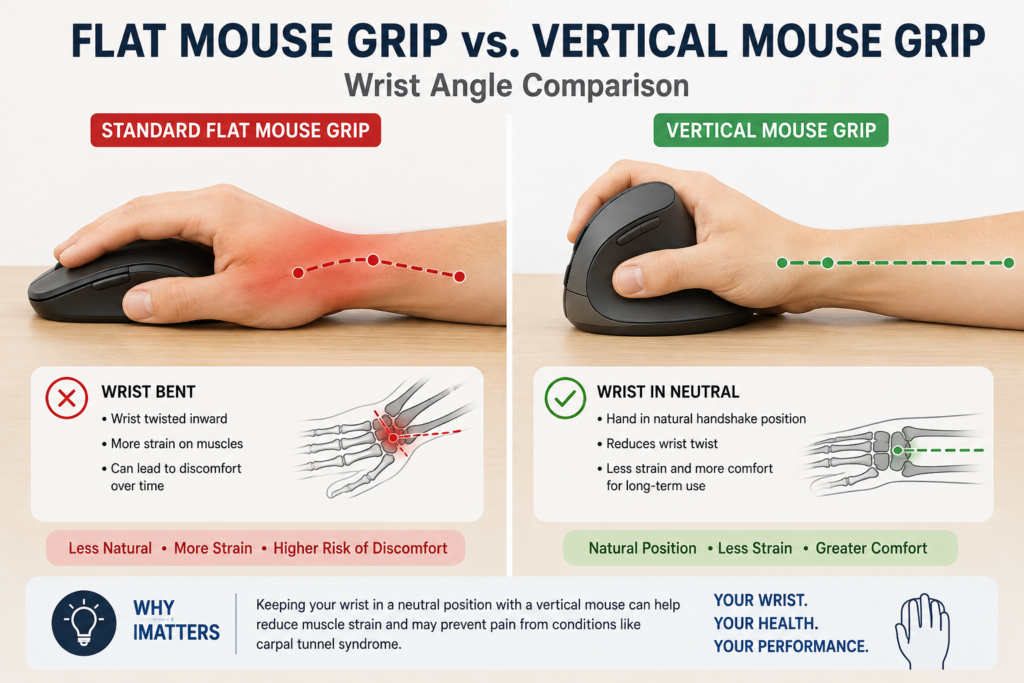
Wrist angle. A standard mouse holds your forearm in full pronation, meaning your palm faces flat down toward the desk for hours at a stretch. Vertical mice tilt your hand into a more natural handshake position, which reduces that twist. The steeper the angle, generally the more the strain is reduced, though very steep angles take longer to adjust to.
Grip style. Vertical mice suit people who want a genuine posture change, while trackballs remove wrist movement almost entirely since your thumb or fingers move the ball instead of your whole hand sliding across the desk. Neither is objectively better, it comes down to which motion feels more natural to you and what you’re already used to.
Hand size fit. A mouse that’s too large or too small for your hand creates its own strain, regardless of how ergonomic the shape is on paper. Most ergonomic mouse brands offer size variants, so check the manufacturer’s sizing guidance rather than assuming one size fits everyone.
Button placement and programmability. Reaching awkwardly for a poorly placed button undoes some of the ergonomic benefit. Look for a design where the primary buttons sit naturally under your fingers without stretching, and where side buttons are optional rather than something your thumb has to hunt for.
Adjustability. DPI settings, adjustable tilt angles, and programmable buttons let you fine tune the mouse to your actual workflow instead of adapting your hand to fit the device. The OSHA Computer Workstations eTool recommends keeping wrists in a neutral, straight posture and moving from the elbow and shoulder rather than the wrist, which is exactly what a properly adjusted ergonomic mouse is designed to support.
The Best Ergonomic Mice Under $100
Logitech MX Vertical — Best Overall
The MX Vertical is Logitech’s flagship ergonomic mouse, built around a 57 degree vertical angle that was developed and tested with input from ergonomists. It strikes a strong balance between genuine wrist relief and the precision and build quality you’d expect from a premium mouse, without crossing over $100.
Key features:
- 57 degree vertical angle for a natural handshake wrist position
- 4000 DPI optical sensor with a cursor speed switch
- Rechargeable battery with up to 4 months of use per charge
- Connects via Bluetooth or the included USB receiver
- Works across up to 3 devices with Logitech Flow
Pros:
- Ergonomist tested design with a measurable reduction in muscular activity compared to a standard mouse
- Strong battery life and fast charging
- Textured grip feels secure during long sessions
- Comfortably fits medium to large hands
Cons:
- Less ideal for smaller hands, where the Logitech Lift fits better
- The steep vertical angle takes a few days to adjust to
- Side buttons take some getting used to for people switching from a flat mouse
Who it’s best for: Anyone who wants the clearest wrist posture improvement without stepping into premium territory, and who has medium to large hands. It’s also a smart pick if you regularly switch between multiple computers, since it supports connecting to several devices at once.

- Wireless Connectivity: The mouse connects to your computer wirelessly via Bluetooth or USB receiver.
- Ergonomic Design: The vertical layout and adjustable angle help reduce strain on your hand and wrist.
- Advanced Tracking: The optical sensor detects your hand movements for precise control.
Anker 2.4G Wireless Vertical Ergonomic Mouse — Best Budget
If you want to try a vertical mouse without committing to a premium price, this Anker option covers the core fundamentals, a vertical handshake grip and a genuinely reduced wrist twist, at a fraction of what the premium options cost.
Key features:
- Vertical ergonomic design promoting a neutral handshake wrist position
- 800, 1200, and 1600 DPI adjustable tracking
- 5 buttons including forward and back navigation
- 2.4GHz wireless connection with included USB receiver
- Automatic power saving mode after periods of inactivity
Pros:
- Genuinely low price point for a real vertical design
- Lightweight and comfortable for shorter to medium length sessions
- Simple plug and play setup with no software required
- Reasonable battery life for the price
Cons:
- Build quality feels noticeably less premium than the Logitech options
- DPI range is more limited than pricier alternatives
- Less refined button feel over long term daily use
Who it’s best for: Shoppers who want to test whether a vertical mouse actually helps their wrist discomfort before investing in a premium option, or anyone furnishing a budget conscious home office setup.

- Experience enhanced comfort and productivity with the Anker 2.4G Wireless Vertical Ergonomic Optical Mouse. Its scientif…
- Enjoy superior sensitivity and precision with this wireless mouse. It boasts 800/1200/1600 DPI Resolution Optical Tracki…
- The Anker Ergonomic Mouse is not only convenient but also user-friendly. It comes with next/previous buttons for effortl…
Evoluent VerticalMouse 4 — Best for Wrist Pain and Carpal Tunnel
Evoluent essentially invented the modern vertical mouse category, and the VerticalMouse 4 remains one of the most frequently recommended options among people dealing with genuine wrist pain or carpal tunnel symptoms rather than just general discomfort. Many users, including medical doctors, ergonomists, and physical therapists, have said the Evoluent VerticalMouse provides superior comfort and relief for wrist pain.
Key features:
- Fully upright handshake posture, more vertical than most competitors
- 6 customizable buttons through the free Evoluent Mouse Manager software
- 4 adjustable pointer speed settings
- Wired USB connection, no charging or pairing required
- Broad bottom lip designed to support the pinky finger
Pros:
- Designed specifically around reducing forearm twisting and wrist strain
- Wired connection means zero lag and nothing to charge
- Frequently recommended in ergonomic and occupational health contexts
- Sculpted shape reduces finger contortion when reaching for buttons
Cons:
- Wired only, which some users find limiting for a tidy desk setup
- The fully upright angle has a steeper learning curve than a moderate tilt
- Design feels more clinical than sleek compared to consumer focused competitors
Who it’s best for: Anyone already experiencing wrist pain, tingling, or early carpal tunnel symptoms who wants a mouse built specifically around addressing that, rather than one that’s ergonomic as a secondary feature. If wrist discomfort is part of a broader home office strain issue, it’s worth reading through our guide on why comfort matters in remote work for the bigger picture on how workstation setup affects daily strain.

- The Evoluent (VM4R) ergonomic mouse reduces hand and wrist strain, making it an ideal option for those who spend long ho…
- This vertical USB mouse provides a stable and reliable connection and is a ready-to-use computer mouse that eliminates t…
- The Evoluent vertical mouse 4 offers precise cursor control and customizable buttons that perform specific actions. It’s…
Logitech Lift — Best for Small Hands
The MX Vertical is designed around medium to large hands, and Logitech built the Lift specifically to fill that gap for smaller and medium hand sizes. It uses a gentler 57 degree angle in a more compact shell, making it one of the better fitting options for people who found other vertical mice too bulky.
Key features:
- Compact vertical design built for small to medium hands
- Quiet clicks for a noticeably softer feel than standard mice
- 4 of 6 buttons customizable through Logi Options+ software
- Bluetooth or included Logi Bolt USB receiver
- Available in a left handed version as well
Pros:
- Genuinely comfortable fit for smaller hands where other vertical mice feel oversized
- Quiet click mechanism is a nice touch for shared or open office spaces
- Reliable Logitech build quality and battery life
- Left handed option is a rare feature in this category
Cons:
- Less suited to larger hands, where the MX Vertical fits better
- DPI ceiling is lower than the MX Vertical
- Fewer programmable buttons than higher end Logitech options
Who it’s best for: Anyone with smaller or medium sized hands who found standard vertical mice too large or bulky, and left handed users looking for a genuine ergonomic option built for their hand rather than a mirrored right handed design.

- Lift yourself up: When the desk life gets you down, lift yourself up with Logitech Lift Vertical Ergonomic Mouse – a gre…
- Raise your hand into comfort: Rest on Lift upright mouse throughout the day, with a softly textured grip and snug thumb …
- 57 degrees of sooooothe: Lift’s vertical shape helps wrists feel like “ahhh” at work, and promotes a more natural postur…
Logitech MX Ergo — Best Trackball Alternative
If a vertical mouse doesn’t appeal to you, or you’ve tried one and it wasn’t the right fit, a trackball takes a fundamentally different approach. Instead of your whole hand and wrist sliding across the desk, your thumb moves the ball while your hand stays largely still, which some people find reduces strain even more effectively than a vertical design.
Key features:
- Adjustable hinge that tilts from 0 to 20 degrees for a customized angle
- 2048 DPI precision optical sensor
- Rechargeable battery via USB-C
- Works across 2 computers with easy switching through Logitech Flow
- Precision scroll wheel for detailed work
Pros:
- Removes wrist and forearm sliding motion almost entirely
- Adjustable tilt lets you fine tune the angle to your own comfort
- Excellent for tight desk spaces since the mouse itself doesn’t need to move
- Strong precision for detailed tasks like photo editing or spreadsheet work
Cons:
- Trackballs have a real learning curve if you’ve never used one
- Thumb fatigue can develop for some users during very long sessions
- Cleaning the trackball periodically is required to maintain smooth tracking
Who it’s best for: Anyone working in a tight desk space, or who has tried a vertical mouse and wants an alternative approach to reducing strain. It also pairs well with a smaller desk setup, since it barely needs any room to operate. If limited desk space is part of your setup, our guide to the best monitor arm under $50 covers another easy way to free up room on a crowded desk.

- Adjustable 0–20 Degree Angle: Customize the trackball angle of this ergonomic mouse from 0 to 20 degrees for a more natu…
- Comfort: 20% Less Muscular Fatigue than a regular cordless computer mouse
- Precision Scroll-Wheel: Precise scrolling, horizontal scrolling and other convenient controls with tilt and middle click…
How These Mice Compare
| Mouse | Design | Best For | Learning Curve | Value |
|---|---|---|---|---|
| Logitech MX Vertical | Vertical, 57° | Overall wrist relief, medium-large hands | Moderate | Strong for the price |
| Anker Wireless Vertical | Vertical | Budget conscious first try | Low | Best entry price |
| Evoluent VerticalMouse 4 | Vertical, upright | Existing wrist pain or carpal tunnel | Higher | Strong, wired only |
| Logitech Lift | Vertical, compact | Small to medium hands, left handed users | Low to moderate | Strong for the price |
| Logitech MX Ergo | Trackball | Tight desk space, alternative to vertical | Higher | Strong for the price |
[IMAGE PLACEHOLDER: Comparison graphic showing all five ergonomic mice side by side]
Which One Should You Choose?
If you’re dealing with real wrist pain or early carpal tunnel symptoms, the Evoluent VerticalMouse 4 is worth the steeper learning curve, since it’s built specifically around that problem rather than general comfort.
If you’re just starting to notice discomfort and want to try a vertical mouse before committing, the Anker budget option lets you test the concept without a big investment.
If you have smaller hands, skip the MX Vertical and go straight to the Logitech Lift, since hand fit matters as much as the angle itself.
If your desk space is tight or you spend a lot of time on detail heavy work, the MX Ergo trackball is worth considering as a genuinely different approach rather than another vertical mouse.
If you want the strongest all around option and have medium to large hands, the Logitech MX Vertical remains the safest and most well rounded pick on this list.
Frequently Asked Questions
Do ergonomic mice actually help with wrist pain? Yes, when the design and fit are appropriate for your hand. Research on alternative mouse designs has found that vertical and angled mice can meaningfully reduce forearm muscle load and wrist strain compared to a standard flat mouse, particularly for people who already spend long hours on a computer.
How long does it take to get used to a vertical mouse? Most people need anywhere from a few days to two weeks to adjust, depending on how steep the vertical angle is. A moderate 57 degree angle like the MX Vertical or Lift tends to feel natural faster than a fully upright design like the Evoluent.
Is a trackball better than a vertical mouse for wrist pain? It depends on where your strain comes from. A trackball removes wrist sliding almost entirely, which helps people whose pain comes from repetitive arm movement, while a vertical mouse specifically targets forearm twisting. Some people benefit more from one than the other, so trying both is reasonable if budget allows.
What is the best ergonomic mouse for carpal tunnel syndrome? The Evoluent VerticalMouse 4 is one of the most consistently recommended options, since it was designed around a fully upright handshake posture specifically to reduce the wrist strain associated with carpal tunnel symptoms. That said, anyone with diagnosed carpal tunnel syndrome should also talk to a doctor about their specific situation.
Are vertical mice good for gaming? Vertical mice generally aren’t ideal for fast paced gaming, since precision and quick lateral movement matter more than posture in that context. Most of the mice on this list are built primarily for productivity and office use rather than competitive gaming.
Final Thoughts
The right ergonomic mouse comes down to matching the design to your hand size and where your discomfort actually shows up. The Logitech MX Vertical is the strongest overall pick if your hands are medium to large, the Anker option is a smart low risk way to try the category, the Evoluent VerticalMouse 4 is worth it if wrist pain is already a real issue, the Logitech Lift fits smaller hands better than almost anything else on the market, and the MX Ergo is worth considering if a trackball fits your workflow better than a vertical design. Whichever you choose, give yourself a genuine adjustment period, most of the benefit shows up after your hand and wrist adapt to the new posture, not on day one.